Product update: Support Portal, Shield and Mautic personalisation

This release makes three things easier: finding documentation, staying online during traffic spikes, and personalising content in real time with Drupal and Mautic. Here's what's new.

1. A New Unified Support Portal

Documentation should be easy to find and easy to trust. That’s why we’ve launched a new unified support portal that brings all Dropsolid documentation together in one place.

Previously, documentation was spread across multiple domains. Now everything lives under a single destination. The result is a cleaner experience for both customers and our internal teams.

Here’s what’s new:

- Single access point: Technical documentation, product guides, and support articles are now available through one portal.

- Better search and navigation: Users can quickly find answers across all products without switching between sites.

2. Introducing Dropsolid Shield (Beta)

How it works

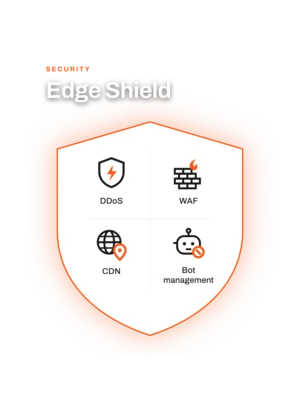
Dropsolid Shield uses rate limiting to control how many requests a visitor can send to your site within a certain time frame.

If traffic exceeds the defined limits, the system temporarily slows or rejects requests, preventing server overload and ensuring the site remains available for legitimate users.

Intelligent traffic classification

To apply the right limits, the system automatically evaluates traffic based on factors such as:

Visitor identity: Regular users, search engine bots, or potentially abusive actors

Origin: Geographic patterns and expected traffic regions

Behavior: Normal browsing vs. aggressive crawling or scraping

Traffic is categorized into groups like trusted visitors, verified bots, general users, restricted traffic, and abusive sources. Each category receives different rate limits, allowing legitimate traffic to continue while preventing overload.

Intelligent traffic classification

To apply the right limits, the system automatically evaluates traffic based on factors such as:

  • Visitor identity: Regular users, search engine bots, or potentially abusive actors
  • Origin: Geographic patterns and expected traffic regions
  • Behavior: Normal browsing vs. aggressive crawling or scraping

Traffic is categorized into groups like trusted visitors, verified bots, general users, restricted traffic, and abusive sources. Each category receives different rate limits, allowing legitimate traffic to continue while preventing overload.

Flexible protection

Through the support team, customers can request:

  • IP allowlisting for trusted integrations or partners
  • IP blocklisting for harmful traffic
  • Temporary limit adjustments for campaigns, events, or imports

Dropsolid Shield is currently in beta and available to select clients as we continue refining the system. Learn more about Dropsolid Shield here.
3. Turning Mautic Into a Drupal Personalization Engine

The most exciting update in this release is a set of new modules that strengthen the connection between Drupal and Mautic inside the Dropsolid Experience Platform. Together, these tools allow marketers to personalize website content and email campaigns using the same segmentation data.

Personalize Drupal Content with Mautic Segments

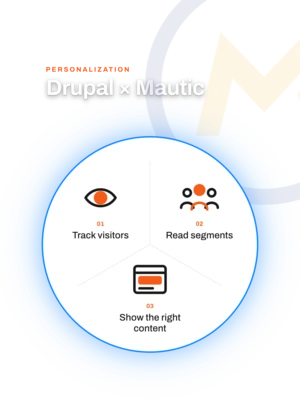
The new Mautic Personalization module allows Drupal content blocks to appear or disappear based on a visitor’s Mautic segment.

Here’s how it works:

  1. Mautic tracks visitor activity and assigns points or segment membership.
  2. Drupal reads that segmentation data through the Mautic tracking system.
  3. Content blocks can be configured to display only for specific segments.

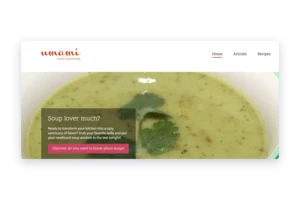
To show how this works in practice, here’s a simple example. In this scenario, we track visitors who show interest in soup-related content and display a personalized banner on the Drupal site once that interest is detected.

This example assumes the required setup steps have already been completed.

Step 1: Set up scoring in Mautic

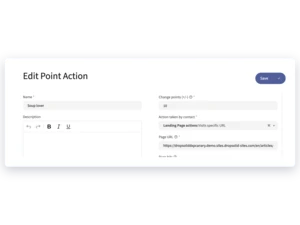
- Go to /s/points in Mautic.

- Create a new scoring action called “Soup lover.”

- Assign 10 points to the action so the scoring threshold is reached quickly for testing.

- Configure the trigger “Visits specific URL.”

- Add the URL(s) of your soup-related content.

Once this is configured, Mautic will start assigning points whenever a visitor views the defined pages.

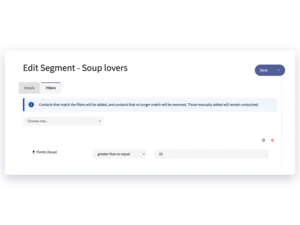
Step 2: Create a segment based on interest

- Navigate to /s/segments.

- Create a new segment called “Soup lovers.”

- Add a filter where Points (soup) ≥ 10.

This ensures that only visitors who have accumulated enough soup-related interest are added to the segment.

Note: Anonymous visitors will immediately appear as contacts in Mautic, but they are only added to segments when the segment updates run via scheduled cron jobs.

Step 3: Create a personalized banner in Drupal

- Go to /admin/structure/block in Drupal.

- Add a new block in the desired region.

- Create a Content block with your soup-related message or banner.

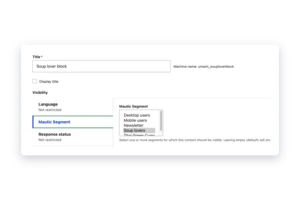
- In the block visibility settings, enable the Mautic Segment condition.

- Select the “Soup lovers” segment.

This ensures the banner is only visible to visitors who belong to that segment.

Step 4: Adjust other banners if needed

If you already have banners shown to all users, you can configure them with the reverse condition so they are hidden from visitors in the Soup lovers segment.

Step 5: Test the personalization

- Visit the website as an anonymous user.

- Navigate to the soup article so the scoring rule is triggered.

- Return to any page where the banner block is displayed.

Once the segment update runs and the visitor is added to the Soup lovers segment, the personalized banner will appear for that user.

Use Drupal Content Directly Inside Mautic Emails

We also introduced the Mautic Content Provider module, which allows Mautic to pull content directly from Drupal.

Inside the Mautic email builder, marketers can now insert:

  • A specific Drupal content item
  • A dynamic list of content from a Drupal view
  • Email-optimized content layouts created in Drupal

This ensures your emails always use the latest website content, without copying and pasting between systems.

For example, you could automatically display the latest blog posts, product updates, or localized content directly inside your email campaigns.

Click here to learn more.


Automate Data Flow Between Drupal and Mautic

Finally, we’ve introduced Mautic ECA, a lightweight connector designed to automate workflows between Drupal and Mautic.

This allows teams to sync data such as:

  • Drupal taxonomy tags
  • Mautic segments
  • Content metadata

With this automation layer in place, marketing and content systems stay aligned without manual updates.


A Step Forward for the Dropsolid Experience Platform

These updates move the Dropsolid platform closer to our vision of a tightly integrated open digital experience platform.

With:

  • a single documentation portal,
  • stronger infrastructure protection, and
  • seamless Drupal–Mautic personalization,

teams can deliver more reliable and more relevant digital experiences.

More updates are already in development, and we look forward to sharing them soon.


Try it yourself

If you're a Dropsolid customer, you can already start exploring these improvements:

  • Visit the new support portal here.
  • Contact our support team if you’d like to test Dropsolid Shield (beta)
  • Explore the new Drupal–Mautic personalization modules to start delivering targeted website experiences.

Need some help?

If you’d like help implementing these features or want to learn how to use them in your platform, reach out to the Dropsolid team. We’re happy to guide you through the setup and best practices.